

65% of employees with ADHD struggle to manage daily work tasks.
And most home office advice does not fix that. It focuses on aesthetics, minimalism, or trends, not how your brain actually works. That gap creates frustration, not productivity.
This guide breaks down a practical ADHD home office setup that reduces distraction, supports movement, and helps you stay on task.
Why Standard Home Office Advice Fails ADHD Brains
Traditional Productivity Setups Ignore Cognitive Load
Most home office advice assumes you can sit still, focus for hours, and ignore distractions. That assumption breaks immediately for ADHD. Your brain scans for stimulation, shifts attention quickly, and reacts to friction in your environment.
So when a workspace looks clean but lacks structure, it does not help. It actually makes things worse. You end up searching for tools, switching tabs, or adjusting your posture constantly. Every small friction point adds up.
ADHD Needs External Structure, Not Just Aesthetic Design
Your workspace must act like external support for your brain. That means systems you can see, touch, and use without thinking. Digital tools help, but they often add complexity.
That is why many ADHD users prefer physical notes, visible storage, and clearly defined zones. These tools reduce mental load and make it easier to return to work after distractions.
Real User Insight: Function Over “Perfect” Offices
Reddit users consistently highlight one thing. Fancy setups do not help if they are not functional. One user described their old workspace as visually appealing but completely ineffective.
Once they switched to dual monitors, better lighting, and simple organization tools, their focus improved immediately.
And that is the pattern. Function beats aesthetics every time in an ADHD friendly workspace.
The Two ADHD Workspace Types (Which One Are You?)
Low-Stimulation Setup (For Easily Overwhelmed Brains)
Some ADHD brains get overwhelmed quickly. Too many objects, colors, or screens create mental clutter. In this case, a low-stimulation ADHD desk setup works best.
This setup focuses on reducing inputs. You keep only essential tools on your desk. You use neutral colors, soft lighting, and minimal decorations. The goal is to remove anything that competes for your attention.
Reddit users often describe this approach as freeing. One user said that once they cleared their desk and limited visual distractions, they stopped constantly shifting focus. Their brain had fewer things to react to.
High-Stimulation Setup (For Understimulated Brains)
Then there is the opposite type. Some people with ADHD struggle because their environment feels too boring. They need controlled stimulation to stay engaged.
In this case, your ADHD home office setup should include sensory input. Music, ambient sound, adjustable lighting, and even scent can help maintain focus.
So, the goal is not less stimulation. It is the right kind of stimulation.
Desk Choice for ADHD: Sitting vs Standing vs Moving
Why Standing Desks Improve Focus
Movement plays a direct role in attention. When you sit still for too long, your brain loses engagement. That is where standing desks come in.
A well-designed ADHD desk setup often includes a height-adjustable desk. It allows you to switch positions throughout the day without breaking your workflow.
Many users report that simply standing for part of the day reduces restlessness. It keeps energy levels stable and prevents the mental fatigue that comes from long sitting sessions.
If you are looking for the best standing desk for ADHD, you need one that adjusts quickly and smoothly. That is what allows you to switch without interrupting your task. Explore options at iMovR to find setups designed for movement-based productivity.
Walking Pads and Treadmill Desks
Some users take it further with walking pads. These setups allow light movement while working.
They work best for tasks like:
-
Emails
-
Meetings
-
Light research
But they can become distracting for deep focus work. That balance matters.
Seating Options That Support Focus
Ergonomic Chairs for Long Work Sessions
A good chair reduces physical discomfort. And physical discomfort leads to mental distraction.
So, an ergonomic chair remains a core part of any ADHD home office setup. It supports posture and allows you to work longer without constant adjustments.
Active Seating Options
Some people need movement even while sitting. That is where wobble stools or balance balls come in. These options allow small movements that keep your brain engaged.
They work well for short sessions or tasks that require moderate focus.
Stable Chairs to Reduce Distraction
Interestingly, some users prefer the opposite. One Reddit user shared that switching to a non-rolling chair improved focus. It removed the temptation to move around unnecessarily.
So, your ideal setup depends on how your brain reacts to movement.
Monitor Setup: Reduce Friction, Not Just Clutter
Dual Monitor Setup for Task Separation
A dual-monitor ADHD desk setup helps separate tasks visually. One screen for communication, one for work. That reduces constant tab switching.
Vertical vs Horizontal Screens
Vertical monitors work well for reading and lists. Horizontal monitors handle main tasks. This combination creates a smoother workflow.
Monitor Arms for Space and Cable Control
Monitor arms free up desk space and reduce cable clutter. That improves both function and visual clarity.
Reddit Insight: One Screen for Tasks, One for Work
One Reddit user explained how this setup changed their workflow. They kept email and task lists on one screen, and deep work on the other. That separation reduced distractions and improved focus significantly.
Lighting Setup for ADHD Sensitivity
Users report that dimmable lights improve comfort and reduce strain during long sessions. That small change has a noticeable impact on consistency.
-
Bright light increases alertness, while warm light helps with calm focus. An ADHD friendly workspace should include adjustable lighting options.
-
Overhead lighting often creates glare and discomfort. That leads to fatigue and distraction.
-
Switching lighting throughout the day helps regulate focus. Bright for active work, softer for deep thinking.
Noise Management: Silence vs Controlled Stimulation
Users often switch between headphones and speakers. One setup does not work for everything. Flexibility matters in an ADHD home office setup.
-
These help block unpredictable sounds. They are especially useful in shared spaces.
-
Some people focus better with sound. Music or white noise can provide consistent stimulation.
-
Deep work may require silence. Routine tasks may benefit from music.
Declutter Systems That Actually Work for ADHD
If you cannot see it, you forget it. That is a common ADHD challenge. So, your system should keep important items visible but organized.
-
Open trays, labeled sections, and categorized zones work better than closed drawers for many users.
-
Divide your desk into clear areas. One for work, one for notes, one for tools. This reduces decision-making.
Many users prefer physical notes over apps. Writing tasks down helps them return to work faster after distractions.
Cable Management Equals Mental Clarity
Organizing cables make workspace feel calmer and easier to use.
Visual Clutter and Focus
Visual clutter pulls attention even when you try to ignore it. Loose cables, tangled wires, and messy setups create constant background distraction.
For ADHD brains, this noise adds up fast. It increases mental fatigue and makes it harder to stay focused on a single task for long.
Tools for Cleaner Setups
You do not need a perfect setup. You need fewer visible distractions. Monitor arms, cable sleeves, and docking stations help reduce what you see daily.
These tools keep cables out of your direct line of sight. That alone makes your ADHD home office setup feel calmer and easier to use.
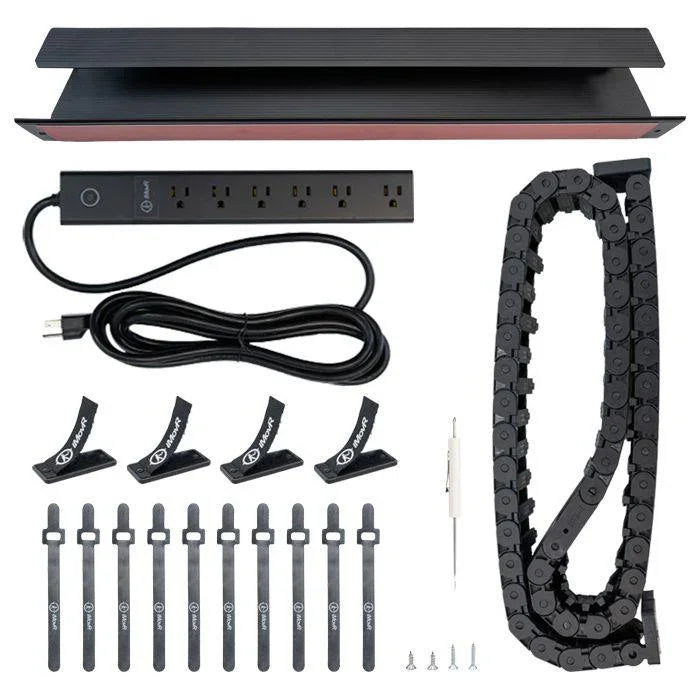
Flexible Cable Management
Your setup will change. You will adjust your desk, move devices, or switch positions during the day.
So, your cable system should allow movement. If it feels rigid, you will stop adjusting your workspace, which defeats the purpose.
Task Management: Physical vs Digital Systems
Reddit users found that writing distractions down helped them stay on task. Instead of switching immediately, they returned to it later.
Why Physical Notes Work
Physical notes remove steps. You write something down instantly without opening apps or navigating menus. This makes it easier to capture thoughts without breaking focus. That is critical in an ADHD desk setup.
Simple Digital Systems
Digital tools work when they stay simple. One task list and one calendar are often enough. If a system feels complicated, you will avoid it. And then it stops helping.
Hybrid Workflow
Many people combine both. They use paper for quick notes and digital tools for planning. This keeps things simple while still giving structure to your day.
Best ADHD Desk Accessories That Actually Help
Some tools make a real difference in an ADHD friendly workspace. But only if they reduce friction.
-
Footrests for comfort
-
USB fans for temperature control
-
Desk mats with note storage
-
Headphone stands for easy access
-
Water tumblers for hydration
Reddit users often highlight these small additions. They seem minor, but they support consistency. And consistency is what builds focus.

A Desk That Works With Your Brain
Movement reduces restlessness. See why height-adjustable desks make a real difference for ADHD focus.
- Ergonomic support for deep focus sessions
- Stable surface reduces peripheral fidgeting
- Ideal for complex, high-effort tasks
- Boosts alertness during low-energy dips
- Reduces restlessness without breaking flow
- Keeps energy stable across long sessions
- Switches position = resets attention naturally
- Best pattern for ADHD: every 30–60 min
- Reduces fatigue and hyperfocus crashes
Where to Position Your Desk for Maximum Focus
Your desk placement shapes how often your attention gets interrupted during the day.
Facing Away from Distractions
Desk placement directly affects how often your attention gets pulled away. If your desk faces a door, window, or high-traffic area, movement stays in your peripheral vision.
That constant motion makes it harder to stay focused, especially during deep work. Position your desk so your main view remains stable and predictable.
Separating Work and Personal Zones
Blending work and personal space creates unnecessary temptation. When personal devices or activities sit within reach, switching tasks becomes effortless.
That is why separating zones matters. Even a small distinction between work and non-work areas helps your brain stay in the right mode.
Using Dividers or Physical Barriers
You do not need a large room to create separation. Simple dividers, shelves, or even repositioning furniture can block visual distractions.
These physical boundaries reduce the urge to shift focus. They create a clear signal that this space is for work, not everything else.
Common ADHD Home Office Setup Mistakes
Small setup mistakes quietly reduce focus and make work feel harder than it should.
Prioritizing Aesthetics Over Function
A visually appealing setup does not always support productivity. Clean designs often ignore how tools are used during real work sessions.
If your setup looks good but slows you down, it creates frustration. Function should always come before appearance in an ADHD home office setup.
Keeping Distractions Within Reach
Phones, tablets, and personal screens can interrupt focus within seconds. When they are visible or easily accessible, resisting them becomes harder.
Moving these distractions out of reach reduces impulsive switching. It creates a small barrier that protects your attention.
Overcomplicating Organization Systems
Complex systems often fail because they require too much effort to maintain. Multiple apps, categories, and workflows add confusion instead of clarity.
Simple systems work better. They are easier to follow and more likely to stay consistent over time.
Ignoring Movement and Flexibility Needs
Staying in one position for too long reduces both physical comfort and mental engagement. ADHD brains respond better to change and movement.
If your setup does not allow flexibility, you will feel restless and lose focus. A workspace that supports movement helps maintain energy throughout the day.
Example ADHD Home Office Setup (Putting It All Together)
A practical ADHD home office setup combines structure, flexibility, and comfort.
Start with a standing deskcable that allows movement. Add dual monitors to separate tasks. Keep your desk surface minimal but functional. Use visible notes for quick reminders.
Then add controlled sensory inputs. Lighting, sound, and small comfort tools. These elements support long work sessions without overwhelming your brain.
And finally, adjust over time. What works today may not work next month. That is normal.
How to Build Your ADHD Office Without Overwhelm
Start small. Do not redesign everything at once.
Pick one area to improve. Maybe your desk. Maybe your lighting. Test it. Adjust it. Then move to the next change.
That approach works because ADHD systems need iteration. You learn what works by doing, not planning endlessly.
Conclusion
An effective ADHD home office setup reduces friction and supports how your brain actually works. Movement, visibility, and simplicity matter more than aesthetics.
Build your workspace around your behavior, not trends.
Explore ergonomic, movement-focused solutions at iMovR and start building a workspace that actually helps you focus.



